


How computer hard drives keep your data safe
Computer hard drives are far more complex than most people realise, and our data would literally be lost without them
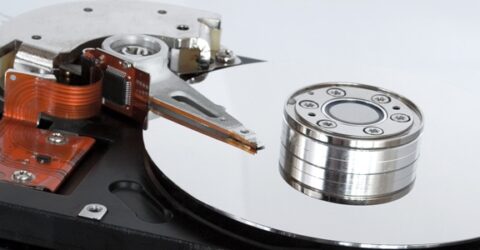
Every computer or web-enabled mobile device requires a number of key components in order to function.
Many of us are familiar with the concept of Central Processing Units (the brains of any digital device) and the Random Access Memory which enables it to temporarily retain information.
Yet other than a vague knowledge of its capacity, few people understand or appreciate the role hard drives play in the functioning of computers, smartphones and tablets.
Whether you’re investing in a high-end gaming PC or buying a budget Chromebook, computer hard drives are the foundation stone on which everything else takes place.
Solid or flashy?
To understand how computer hard drives work, it’s important to recognise there are two distinctly different types of storage device.
The traditional version, familiar to anyone who’s ever seen inside a computer tower, is the Hard Disk Drive.
Magnetic discs spin around with a read/write head floating nanometres above them, scanning the magnetic orientation of the material and interpreting this as binary data.
A more compact and mobile-friendly alternative is solid state storage, where flash memory is stored in transistors as electrical charges.
By applying a voltage to the cell, it’s possible to determine whether it’s charged or not charged, which gives the same binary output as the magnetic orientation on an HDD.
There are numerous differences between these two systems in terms of stability, cost, noise, lifespan and reliability.
Crucially, they also perform differently when it comes to how data is organised, which can affect long-term performance…
Drive and determination
Computer hard drives are responsible for storing every bit or byte of digital data which is downloaded, installed, created or edited.
You might assume they’d neatly subdivide content into these categories, or perhaps compartmentalise it by date, or file type, or some other common factors.
Yet HDDs don’t.
Data is scattered across the disc in a format that makes sense to the computer, but might seem somewhat random to a human.
It relies on a File Allocation Table to find specific pieces of data.
Over time, that data becomes fragmented and scattered, making access more time-consuming and slowing response times when a request is made by a user.
Although you can instruct a computer to defrag a HDD, this is an inexact science, because it involves retrospectively trying to fit existing data into unused spaces beside other similar data.
By contrast, SSDs are more orderly in their storage.
They maintain consistent performance over time, and they’re quicker thanks to the absence of moving parts. This is beneficial from startup to file transfers and loading applications.
Safety first
Because data is more securely and logically stored on SSDs, safety is improved.
The lack of moving parts also means dropping a device won’t damage it the way it might with a spinning magnetic disc.
There’s less need for cooling fans (also regulating the temperature of other device components) or impact protection around discs spinning at up to 7,200RPM.
Regardless of their differences, both HDD and SDD devices can remember where each piece of data is stored, so it can be accessed in a fraction of a second following a user request.
They’re admittedly slower than the RAM used to calculate and process things while a computer is switched on, but RAM is effectively wiped when electricity is no longer available.
Hard drives will retain information for many years without being powered up, while additional security can be added by encrypting data so it can’t be viewed by third parties.